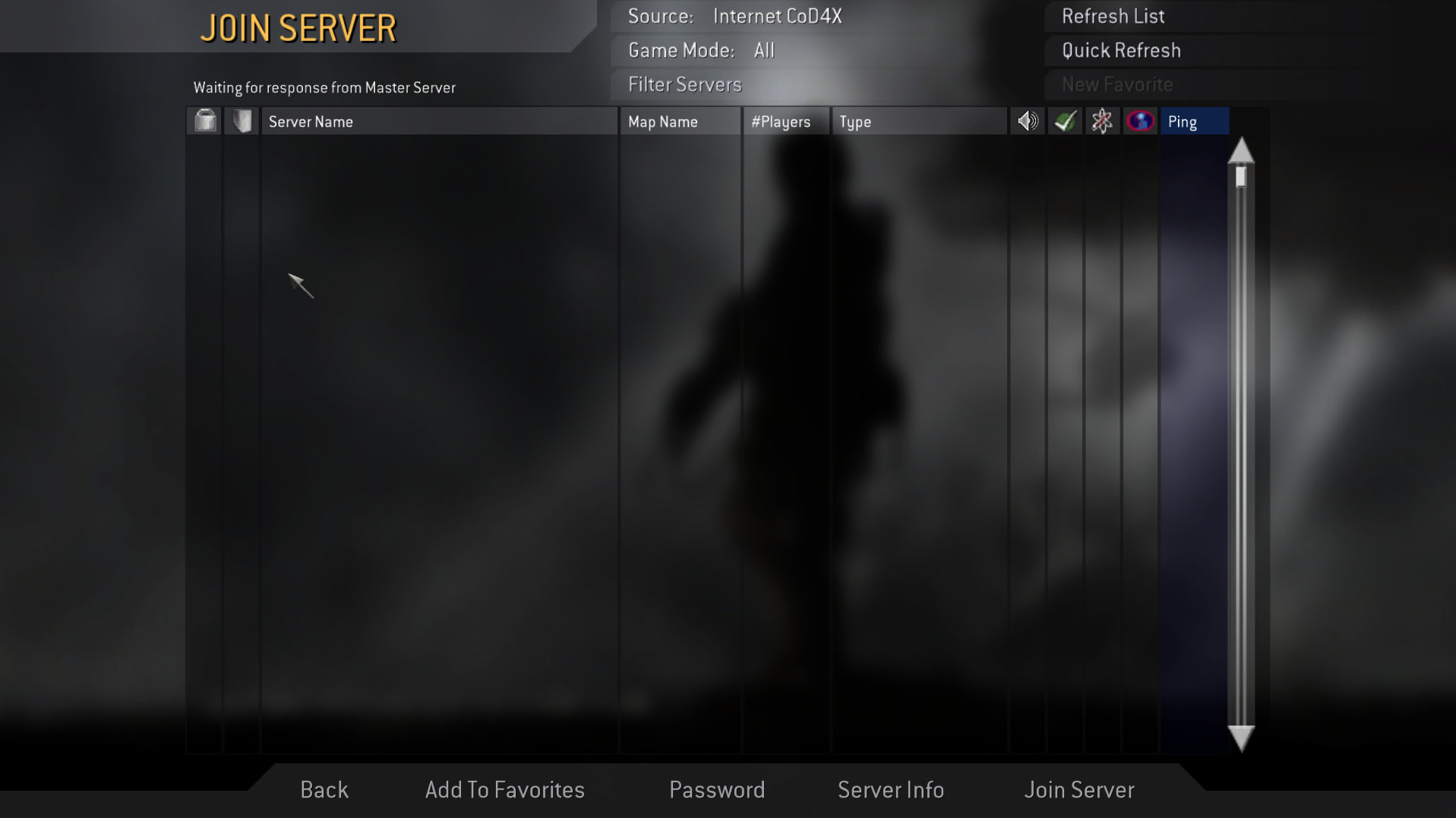
still empty, idk how you guys being able to play this game on Linux
im starting to lose my mind, other players can play on Linux, whats wrong with mine i cannot play, i cannot connect to a server, i cannot play on Linux even if i tried everything i can
I gave up, it doesnt works on Linux. Thats it.
I dont think im doing something wrong in here, maybe its because of computer itself who knows, but it works on Windows at least, until Windows 10 ESU dies, i have time to play it until October 2026, later we will look again this thing, i will try to create 1-click Linux launcher just for this issue and make easy for other players to play on Linux with Auto Updater, includes everything that COD4X has etc. It will take time but it will worth it, until thats done, Windows is way to go
When its done, AlexC, do i have a contact way with you or developer team to test it and publish it under COD4X?
Try to google a different CD-Key, that might solve your issue, as I said, I was able to connect just fine, Arch Linux, no issues. Tried COD4 Oregek, FNRP RotU-R, and 1 CJ server as well, all worked.
I dont think i have a CD Key issue, because i have no problems on Windows, only i have issues on Linux
I dont know whats going wrong, i tested on Arch Linux, same result, different network same result, only thing i didnt tested was trying on different computer, if its about computer then why on Windows it has no problems and works fine?
Lets figure it out. I don’t know which distro you are on, I’m on arch but lets see if my thoughts will help you out.
- Change the compatibility layer to Proton-GE if you are not using that.
- Change your CD key inside the game: https://www.yob.at/cod4-keygen/
- Try to ping these adresses: cod4master.cod4x.ovh, cod4master.activision.com
If you get a response your connection is okay. If not, try using VPN. If still no response you have to setup your firewall correctly. - Make sure your game files are 100% legit and you installed cod4x correctly, on some servers if your iwd files are corrupted or not original you get instant ban since its one way of cheating.
PS: The ingame cod4x server browser doesn’t work on linux since a few days, use this website: CoD4X CODTV
Ingame to the console: /addfavorite IP
Now your chosen server will be in the favorites, and you can connect whenever you want.
1.I did it, nothing changed
2.CD Key isnt a issue also tried it too no difference
3.I will try it
4.I installed from STEAM im playing since 2019, having no issue on Windows and im playing right now still no issues, but one every linux distro, i have same issue
Probably a firewall issue, or if you are dual booting (you mention windows a lot) make sure cod4 is not installed on an NTFS drive, that can be another issue on linux.
1.Its installed to EXT4
2.I tried closing firewall then launching, no difference
no difference in what? you cant connect? are you still banned on all servers? or you dont see servers - if so I told you why thats happening (thats an issue for everybody)
i made test nearly 1 week ago when no problems existed on COD4, i was cannot connect, i was banned on some servers, i was cannot see servers etc. same problems
Server list not loading for me on Rocky Linux. Is this a Linux specific issue?
No, read the headline on the main page.
Master is back up, you should be able to see servers now.